What’s new in version 2.4
Stock Sector Monitor has been rebuilt from the ground up with an up-to-date sector database, a whole-market overview and a full charting module. The installer upgrades your existing copy, keeps your license and your own groups, and the upgrade is free for registered users.
Features
Up-to-date market sectors
- All-new sector database: 11 sectors, 149 industries and about 5,350 US-listed stocks
- Every stock in each industry is included, with quotes refreshed in fast parallel batches
- Your own groups (Watch List, Holdings and any you create) next to the market sectors
- Choice of real-time data feeds with automatic fallback if one is unavailable
- Last quotes are kept, so lists show data even when you are offline
- Positive / negative / unchanged count for the selected group in the status bar
Market Overview
- The whole market at a glance: all 11 sectors with their industries
- Cap-weighted, equal-weighted and median % change for every sector and industry
- Breadth (stocks up / down), best and worst stock, total market cap and volume
- Sort by any column; double-click an industry to open its stock list
Built-in stock charts
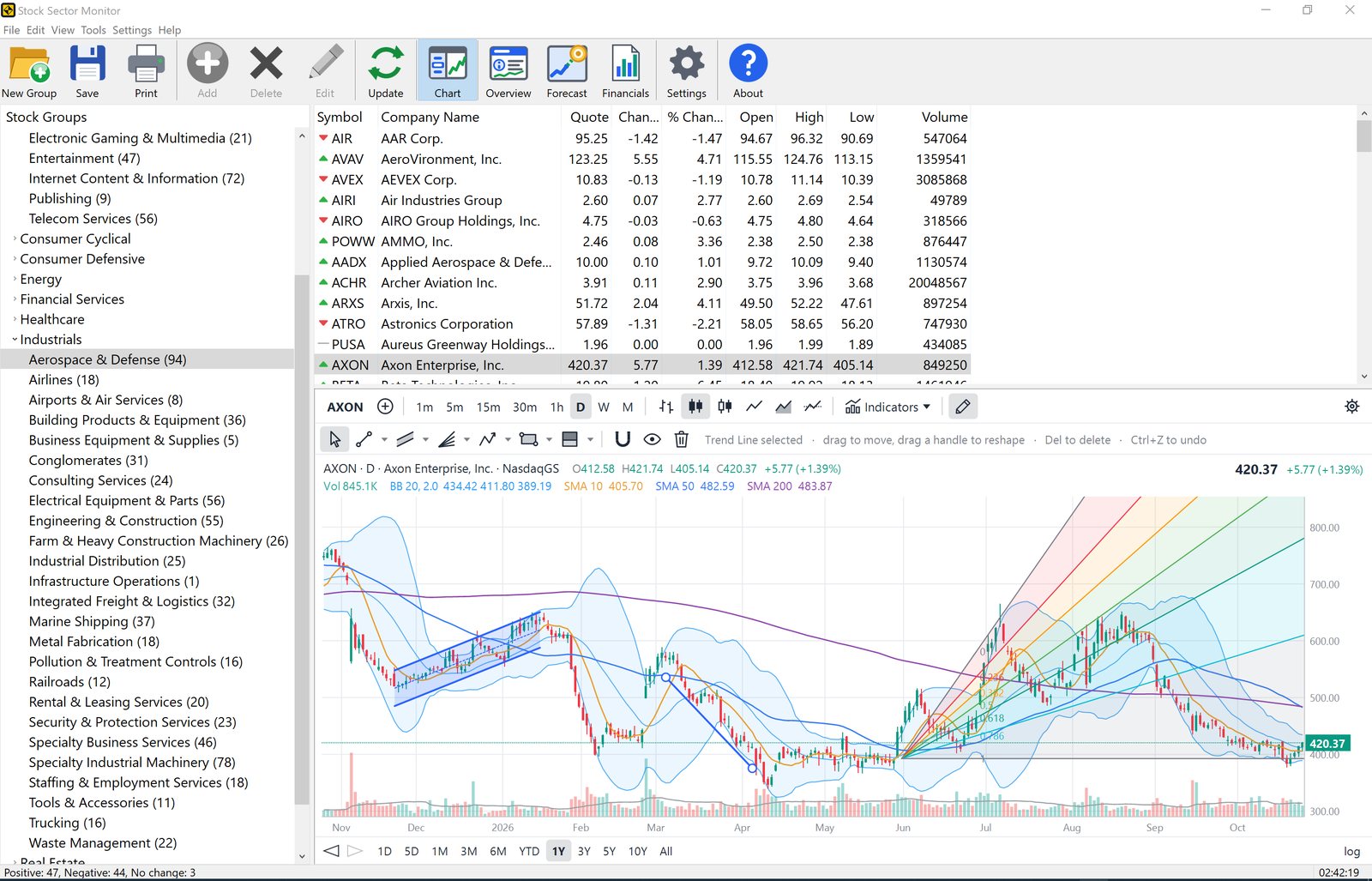
- Chart panel under the quote list that follows the selected stock
- 6 chart styles: Bars, Candles, Hollow Candles, Line, Area, Baseline
- Intervals from 1 minute to monthly: 1m, 5m, 15m, 30m, 1h, Daily, Weekly, Monthly
- Ranges from 1 day to all history; mouse-wheel zoom, drag to pan, logarithmic scale
- Crosshair with live price and indicator values; compare several symbols on one chart
32 technical indicators
- Moving averages: SMA (×3), EMA (×2), WMA, Hull MA, VWAP
- Bands and channels: Bollinger Bands, Keltner Channels, Donchian Channels
- Trend overlays: Ichimoku Cloud, Parabolic SAR, SuperTrend, Pivot Points (Classic, Fibonacci, Camarilla)
- Oscillators: RSI, MACD, Stochastic Fast/Slow, Stochastic RSI, Williams %R, CCI, MFI, Rate of Change, Momentum
- Trend strength and volatility: ADX/DMI, Aroon, ATR
- Volume: Volume with moving average, OBV, Chaikin Money Flow, Accumulation/Distribution
- Every parameter and color is adjustable
26 drawing tools
- Lines: Trend Line, Ray, Extended Line, Horizontal Line/Ray, Vertical Line
- Channels and pitchforks: Parallel Channel, Regression Channel, Andrews’, Schiff and Modified Schiff Pitchforks
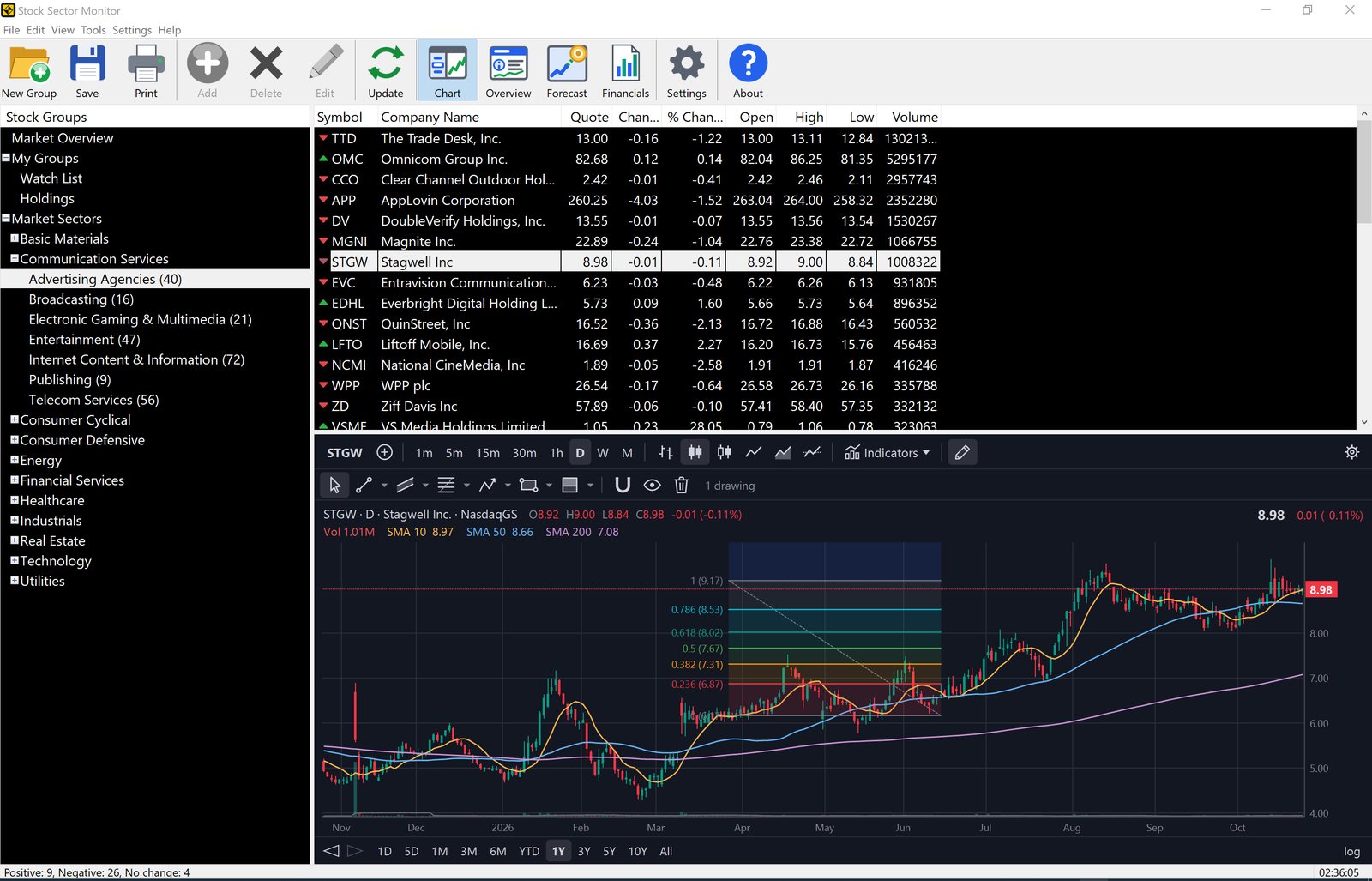
- Fibonacci: Retracement, Extension, Time Zones, Fan, Arcs
- Patterns: Path, Impulse Wave (1–5), Corrective Wave (ABC), XABCD Harmonic Pattern
- Shapes and notes: Rectangle, Text notes, Buy/Sell arrows
- Long and Short Position tools with target, stop and reward/risk ratio
- Magnet snapping to open/high/low/close, undo, and drawings saved per symbol
Faster workflow
- Add Symbol with autocomplete: type a ticker or company name and pick from instant suggestions
- One-click research pages for the selected stock: Overview, Forecast and Financials
- Modern high-DPI interface with a new toolbar, crisp on any monitor; light and dark color schemes
- Your layout (window, panels, selected group and stock, chart) reopens exactly as you left it
- Cleaner printing: columns always fit the page, with headers repeated on every page
Screenshots
How it works
The Stock Groups tree on the left holds the Market Overview, your own groups and the market sectors. Expand a sector and select an industry: the list on the right shows every stock in it with quote, change, % change, open, high, low and volume, and the status bar counts how many are up, down and unchanged. Select a stock and the chart below follows it; switch the interval, add indicators from the Indicators menu or draw with the tools on the drawing toolbar.
Use Overview, Forecast and Financials on the toolbar to open research pages for the selected stock, Add to put any symbol into your own groups, and Print for a sector snapshot.
Frequently asked questions
What is new in version 2.4?
Version 2.4 is a complete rebuild: an all-new sector database (11 sectors, 149 industries, about 5,350 US stocks), a Market Overview of every sector and industry, built-in stock charts with 32 technical indicators and 26 drawing tools, symbol autocomplete and a modern high-DPI interface.
Is the upgrade free for registered users?
Yes. Registered users can download and install version 2.4 at no charge; the installer upgrades the existing copy and keeps your license and your own stock groups.
Can I try it before buying?
Yes. The download is a free evaluation version. A license costs $49.95 and the unlocking key is emailed after your order.
Which versions of Windows does it run on?
Windows 10 and Windows 11, 32-bit and 64-bit.
Does it work offline?
The last downloaded quotes are kept, so your lists still show data when you are offline; quotes refresh as soon as you are connected again.
Ordering
After a completed secure online order, an unlocking key file is emailed to you within two business days. Questions about ordering or registration: order@ashkon.com. Registered users who need their license key resent can email their order ID.


